Wake AHEC

Find Your Webinar

Wake AHEC is in the process of changing our recorded webinars so that they are presented within our new learning management environment.  Not all of our recorded webinars have been changed.  If you have registered for one of our other recorded webinars, you will notice that this one is different.   You will access this webinar through you MyAHEC login under the My Courses and Events link on your dashboard.  Please review the following instructions for accessing your webinar. 
To Access Your Webinar:
  • Please read the following instructions before you begin by using the link in the box at the right.
  • The link at the right will take you to your dashboard if you are signed in.  If you are not signed in, the link will take you to the sign-in page.   
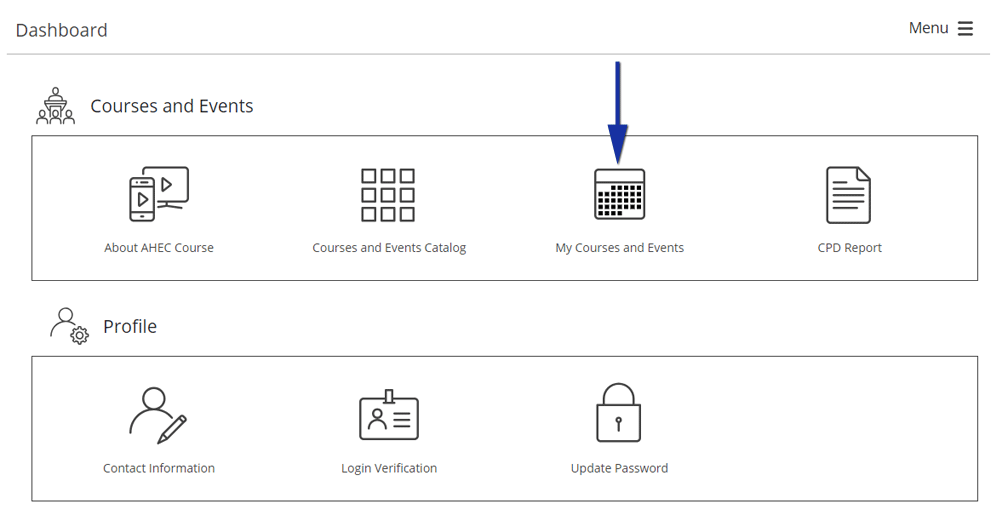
  • Once you log in with your MyAHEC email and password, you will be taken to your Dashboard.
  • Click on “My Courses and Events.”
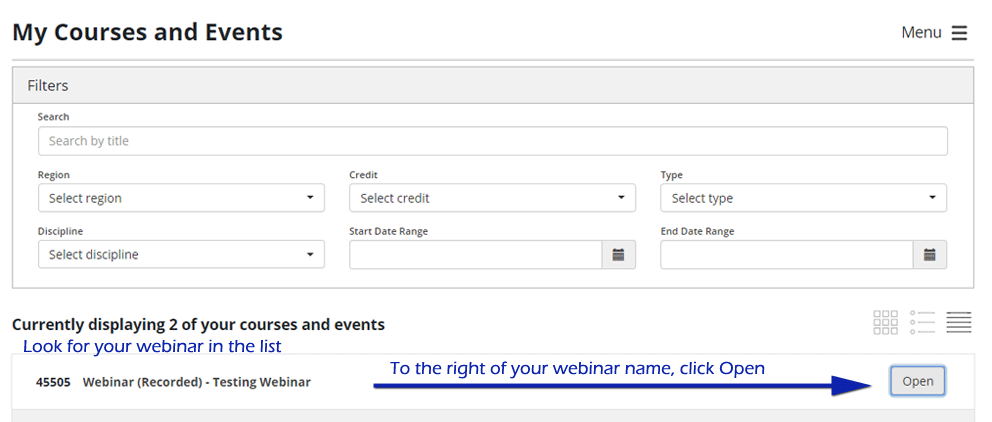
  • Scroll down to find the name of this recorded webinar, and click on the “Open” link on the far right hand side.
  • Links to all of the course materials are displayed either below the graphic or in a list beside the graphic. Click on each link to complete your course.  Any files that you download will go to your download folder
  • If you have any questions or problems, please either email us at wakeahecinfo@wakeahec.org or call us at (919) 350-8547.
After reviewing
the instructions,
click here
to begin.
This is an example of what your dashboard will look like.
MyAHEC dashboard
This is an example of the My Courses and Events page. 
my courses and events